Unable to install windows 7 themepack
Sometimes when you download and trying to install windows 7 themepack in your system, the setup file will not be executed. It may be due to the fact when the 9th character of the themepack title is empty, it cannot be installed.
For example,
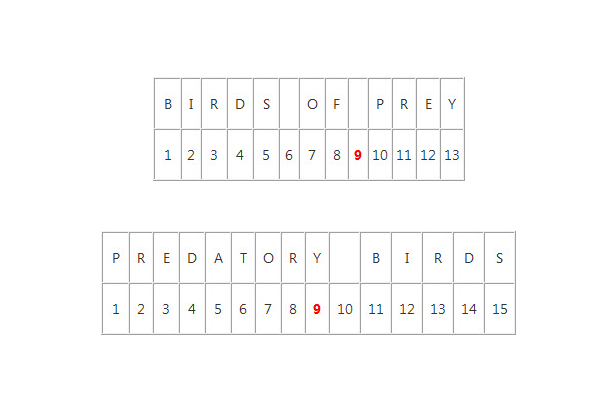
In the above themepack, 9th character space is empty. Microsoft didn’t explain about this error, but this problem occurs in rare cases.
It cannot be installed only when the 9th space is empty. To fix it, rename the themepack filling the 9th space.
Let it be, predatory birds
You have to rename themepack in xml file of themepack. Each themepack has a set of xml files, and a folder of wallpaper and sound. Open .theme file in notepad, and rename themepack.

To open up .theme file,
1.Go to themepack folder and in view menu uncheck hide extension for known type.
2.Extract the content of .cab file and double click the cab file.
3.In cab file, you can find the .theme file.
4.Open .theme file in a notepad, and rename it.
5.Save and execute it now!