Safe file storage and handling in windows 7
Windows 7 has default libraries or folders such as documents, pictures, music and video to save the files correspondingly!
You can tag files on these libraries without moving files from its original location.
Since the libraries are named rightly, you can access the file which you want if you tag those files accordingly! But these libraries are particular to each user profile. If the profile get corrupted, then the entire library will be lost. To avoid it, have a backup of all your file before tagging it to the libraries.
Or you can Separate drive to save these files. Select a drive and create folders and sub-folders to store files accordingly. If you are a business man then you may have store each client separately as per year and date. So create a chart as shown below in choosen drive!
Using libraries also you can store the file accordingly by adding to existing library or creating new library. If you want to store different kind of music, create new library such as pop, melody, jazz, classical etc. so that you can store the files accordingly! For business clients, you can create new library for each clients.
To include the file in library, right click of that file-include in library-create new library.
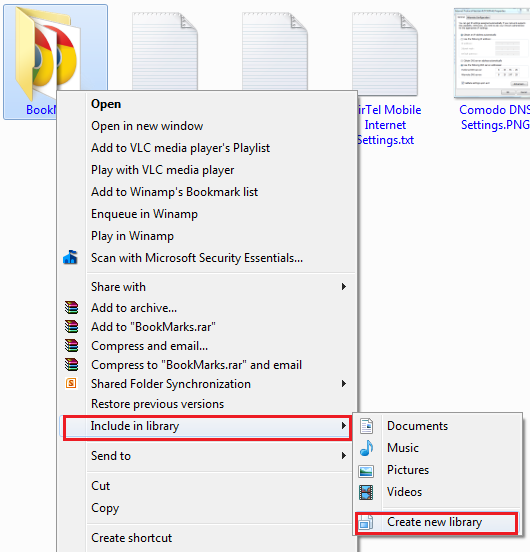
So if you are about to delete any created library, files in that library alone will be deleted and the other existing files will be safe!
To access file easily, use jump menu. Using jump menu, you can files recently and the files pinned to it!

You can use the jump menu on files when it is on taskbar only. You can drag any files from library and pin it to the files on taskbar. Once you drag and place it on taskbar, pin option will be enabled.
So when you open that file, it will open along with files you pinned to it!
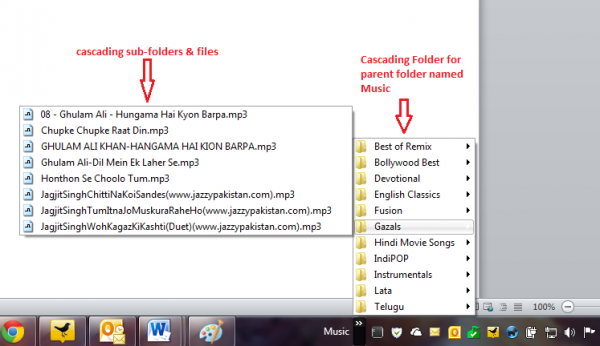
If you are accessing a folder regularly, everytime going to explorer and selecting the folder. You can dock that folder in windows taskbar to access it easily. To do that, right click on empty space on taskbar-toolbar-new toolbar-select the folder you want to access frequently.